

Exporting Database Data to the File System for Reuse in Django
Exporting Database Data to the File System for Reuse in Django
Export data from the database into File System in Parquet format Files, organize it hierarchically by date, store it in Amazon S3, and enable efficient querying using Apache Drill. Here’s a detailed step-by-step guide to implementing this plan.
Why Parquet?
- Columnar Storage: Optimized for analytical queries, especially for selective columns.
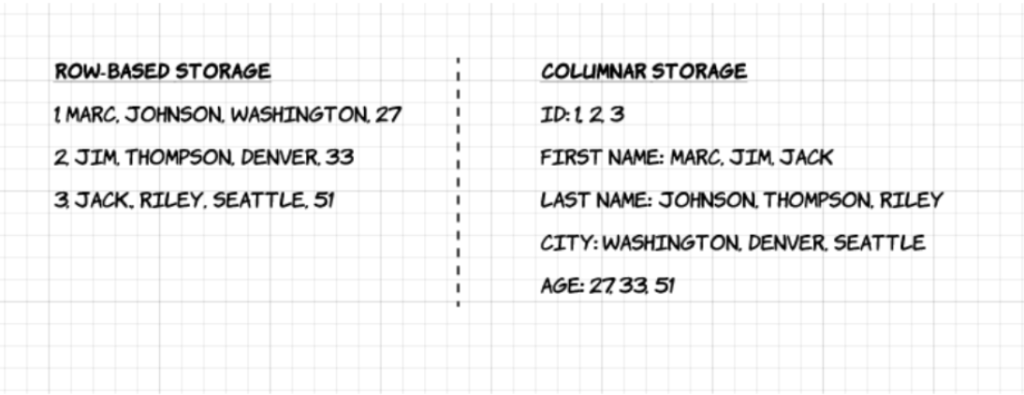
- Compression: Efficient storage with smaller file sizes compared to raw CSV or JSON.
- Fast Read/Write: Ideal for handling large-scale data workloads.
Proposed Data Export Structure
Organize exported files based on the detected_at column for easy access:
/year/month/date/package/location/<vehicle_number>.parquet
Example:
For a vehicle detected on 2023-12-01:
/2023/12/01/city/highway1/ABC123.parquet
Implementation Steps
1. Database Query Optimization
- Use pagination or a batch query approach to avoid loading all data into memory at once.
- Example Query:
1234SELECT * FROM dm_detection_vsds_detections_historical_dataWHERE detected_at BETWEEN '2023-01-01' AND '2023-01-02'LIMIT 1000 OFFSET 0;
2. Export Rows as Parquet Files
- Utilize libraries like PyArrow or Pandas in Python for Parquet file creation.
- Example Code:
123456789101112131415161718import pandas as pdimport pyarrow as paimport pyarrow.parquet as pqimport osdef export_to_parquet(row, base_path):# Prepare directory structuredetected_at = row['detected_at'] # Assuming datetimeyear, month, day = detected_at.year, detected_at.month, detected_at.daypath = f"{base_path}/{year}/{month:02}/{day:02}/"os.makedirs(path, exist_ok=True)# Generate file name and savefile_name = f"{path}/{row['vehicle_number']}.parquet"table = pa.Table.from_pandas(pd.DataFrame([row]))pq.write_table(table, file_name)return file_name
3. Delete Processed Rows
- After successful export, delete rows from the database to free up space:
123DELETE FROM dm_detection_vsds_detections_historical_dataWHERE id = <row_id>;
4. S3 Integration
- Use AWS SDK (Boto3) for uploading files to S3:
1234567import boto3s3 = boto3.client('s3')def upload_to_s3(file_path, bucket_name, s3_key):s3.upload_file(file_path, bucket_name, s3_key)
5. Cron Job Design
Create a Python script and schedule it with cron:
- Read data in batches from MySQL.
- Convert each row to a Parquet file and upload it to S3.
- Log progress to ensure no data loss.
Cron Job Example:
|
1 2 |
0 2 * * * /usr/bin/python3 /path/to/export_script.py >> /path/to/logfile.log 2>&1 |
Future Usage with Apache Drill
- Setup: Install Apache Drill and configure it to query files in S3.
- Query Example:
1234SELECT vehicle_number, speed, detected_atFROM dfs.`s3bucket/2023/12/01/`WHERE speed > 100;
Challenges and Solutions
1. Ensuring No Data Loss
- Maintain a log of processed rows to resume from the last successful batch in case of failure.
- Use database transactions to ensure rows are deleted only after successful file export and S3 upload.
2. Performance Optimization
- Process files in parallel using libraries like multiprocessing.
- Compress Parquet files to further reduce storage costs.
3. Scalability
- Store files in partitioned S3 buckets for faster querying:
s3://bucket/year=2023/month=12/day=01/
4. Monitoring and Alerting
- Use a monitoring tool like CloudWatch or a logging framework to track job execution and notify on failures.
Conclusion
This solution enables efficient offloading of historical data from a MySQL database to a file system while ensuring it remains accessible for querying. By leveraging Parquet format and tools like Amazon S3 and Apache Drill, we achieve a scalable and cost-effective way to manage and analyze large datasets.
Resources:
Why use apache parquet:
https://www.upsolver.com/blog/apache-parquet-why-use
Related content

Auriga: Leveling Up for Enterprise Growth!
Auriga’s journey began in 2010 crafting products for India’s [...]




